Free to start. No cut of what you are paid.Start free

F&B

Your own ordering website.
And the kitchen behind it.

Your website, your payments and your back office, made for food. Customers order and book on your website and pay by GCash or Maya. Behind it sit the prep list, what every item costs to make, your ingredients and waste, a counter till, a kitchen display and your accounts.

For one outlet, from your home kitchen to your café. Free for up to 15 sales a month, then ₱399 a month.1

A small café seen from above with its walls cut away: diners at tables, the owner at the counter serving a customer, a cook in the kitchen, shelves of ingredients in the store room and a desk with a laptop at the back, all joined by gold lines.

BooksSales and food cost in your P&L

KitchenPrep list and kitchen display

WebsiteOrders and table bookings

StockRecipes, ingredients, waste

CounterTill and table QR orders

TeamA login for each person

  1. WebsiteOrders and table bookings, paid by GCash or Maya
  2. CounterTill and table QR orders
  3. KitchenPrep list and kitchen display
  4. StockRecipes, ingredients, waste
  5. BooksSales and food cost in your P&L
  6. TeamA login for each person
One outlet. One system. An order from the website, the counter or a table goes to the kitchen, takes its ingredients off the shelf and lands in your books, without typing it twice.4

What you get

Three layers.
One system.

What your customers see, what you run the day on, and the paperwork behind it. Most food businesses buy these from three different places. Here they are one. Click a website to open it.

1 · For your customers

Your website

Where customers browse the menu, order, book a table and pay by GCash or Maya, then check on their order.

  • Menu, ordering and table booking
  • Bank transfer straight to you
  • Order page, receipts and reviews
  • A Journal (blog) on Google
2 · For you and your staff

Your kitchen and counter

Where you run the day. Every order, wherever it came from, lands here, and so does what it takes to make it.

  • Prep list and kitchen display
  • Counter till and table QR orders
  • Menu, recipes and cost to make
  • Ingredients, stock and waste
3 · Runs by itself

Your back office

The boring part. Sales and costs arrive on their own, so the numbers are ready when you need them.

  • Reporting: your profit and loss
  • Every sale goes in by itself
  • Cost of goods from your Inventory
  • Export whenever you like
Customer orders on your website→ It is on your prep list→ The sale is in your accounts

Nobody types it twice.4

Not a café yet? Good.

Start at home.
Grow into a shop.

You do not need a restaurant to use F&B. Use only the parts your business needs today. The rest waits until you need it.

Home kitchen

Take orders from home

Your own ordering website, paid by GCash or Maya. Pickup points or delivery, on the days and times you choose. A prep list for each day, so nobody adds up orders at midnight. For home food sellers

Your first counter

Sell over the counter too

Moving into a licensed kitchen, a stall or a kiosk? Add the counter till for walk-in sales, cash, GCash, Maya or card. Counter sales and website orders land in the same books.

Café or restaurant

Open the doors

Everything before, plus table bookings, ordering by QR at the table and a kitchen display that shows website, counter and table orders in one queue.

Free while you make up to 15 sales a month, then the same ₱399 a month from home kitchen to café. When you open a shop, nothing moves: your menu, customers and books are already there.1

The same baker grows from a home kitchen to a takeaway kiosk and a café.

Set up your menu once.
Then just cook.

Your menu, your pickup times and your bank details go in once. After that, orders arrive, the lists write themselves, and the books keep up.

01

Choose your look

Two website templates and six colours, with your photos, story, FAQ and reviews.

02

Customers order and pay

Pickup or delivery, a collection day and time, choices like a size, a spice level or a message on the cake. Paid by GCash or Maya, straight to you.3

03

You make it

The prep list adds up each day. Confirm a payment and the recipe takes the ingredients off your shelf.

04

It is in your books

The sale and what it cost to make land in your P&L on their own, so you can see what each item really earns.4

What comes out of
one order.

Order WSH-0142 · Burnt cheesecake, 8 inchCollected
Ordered on your website, collect Saturday 12pm₱2,320.00
Paid by bank transfer, you mark it receivedThu 9:14pm
On Saturday's prep list, with "Happy 60th, Mum!"1 of 14
Ingredients taken off your shelf by the recipe₱700.00
Ready on the kitchen display, customer emailedSat 11:40am
Sale in your P&L, cost of making it beside itSame day
What you kept on this cake₱1,620.00 · 70%

Nobody adds up orders at midnight. The prep list counts every item and every choice for each day, and shows what is still waiting for a payment check.

You finally know your margin. A recipe says what it uses and how many it makes; the cost comes from what you actually paid for the flour, the chicken or the coffee beans.

And you see your waste. Throw away a burnt tray or spoilt milk, count what is left now and then, and the gap between what orders used and what left the shelf shows up in pesos.

How we compare

F&B vs
an ordering site

A simple ordering site takes the order and stops there. Everything after it, the lists, the costs, the stock and the accounts, is still yours to do by hand.

F&B
A home ordering site
Your own website, paid by GCash or Maya
Yes, two templates, on your own domain if you like
Yes
What to make for each day
A prep list, choices counted
A list of orders to add up
What each item costs to make
From your recipes and real prices
A spreadsheet, if you have one
Ingredients and waste
Taken off as you sell, waste in pesos
No
Table bookings, a counter till, a kitchen display
Yes, and ordering at the table by QR
No
Your accounts
Sales and costs posted for you
Exported and retyped
Live in five minutes from a photo of your menu
You set it up yourself, with our help guides
Yes
What it costs
Free for 15 sales a month, then ₱399 a month for everything, no commission
A monthly fee for the ordering site alone6

Price

Start free.
₱399 a month for everything.

F&B comes with Pro 365, alongside everything else in SME AI Office. No commission on your orders and no per-order fee. Start on the Free plan, and move to Pro 365 when you need more.

Free
₱0 / month
no card, no time limit
  • Up to 15 sales a month: orders, bookings and counter sales together
  • Your order website, paid by GCash or Maya
  • Prep list, pickup and delivery times, recipe costing
Start free
Pro 365
₱399 / month
no cap on sales, cancel any time
  • Everything in SME AI Office, F&B included
  • Unlimited orders, items and recipes, no commission
  • A login for each person in your team
Get Pro 365
Menu and recipesAll day
Burnt cheesecake, 6 inch · costs ₱450.00keep 71%
Laksa, bowl · costs ₱84.00keep 70%
Flat white · costs ₱38.00keep 79%
Sold onWebsite · Table QR · Counter

What each item costs to make and what you keep, and where each one is sold.

Kitchen displayToday
12 · Jolene · Counter, takeawayMaking
T5 · Table 5, round 2Making
142 · Farid · Website pickup 12pmReady
One queueWebsite, counter and tables

Every order to make today, wherever it came from, oldest first.

Features

Everything in it.

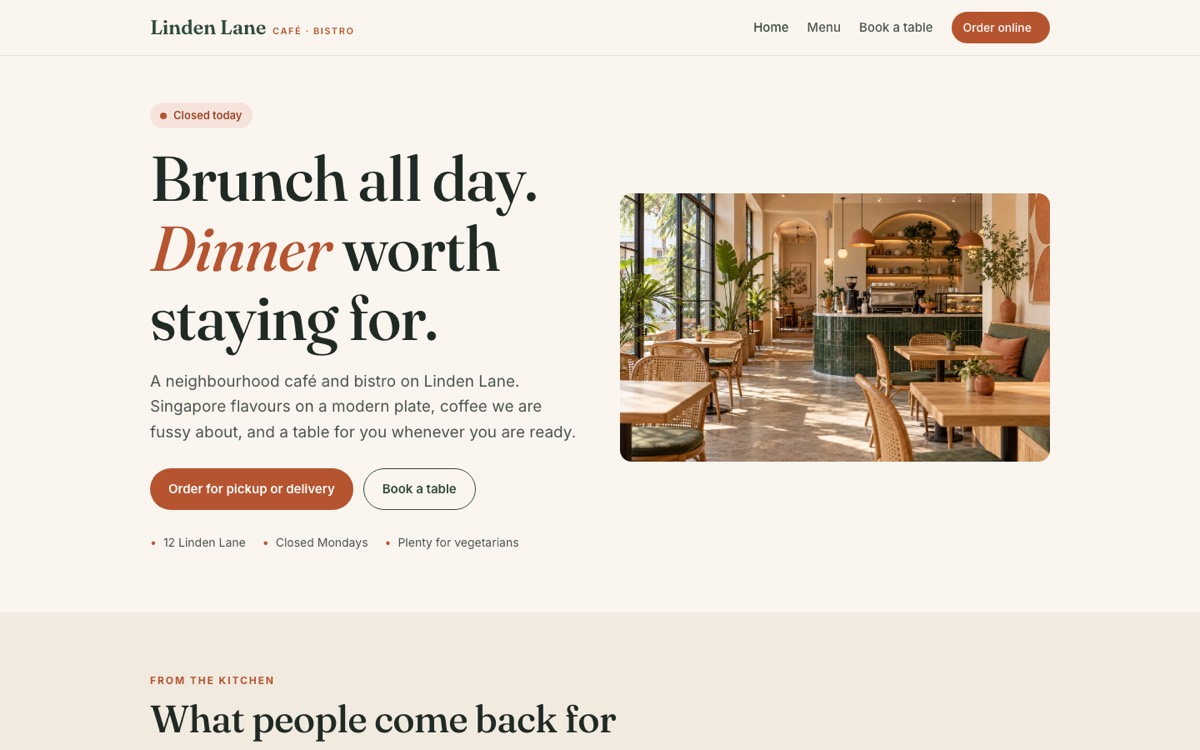
The Café look, shown on Linden Lane

Soft and warm. Serif headings, a cream background and rounded cards.

See it working: Linden Lane
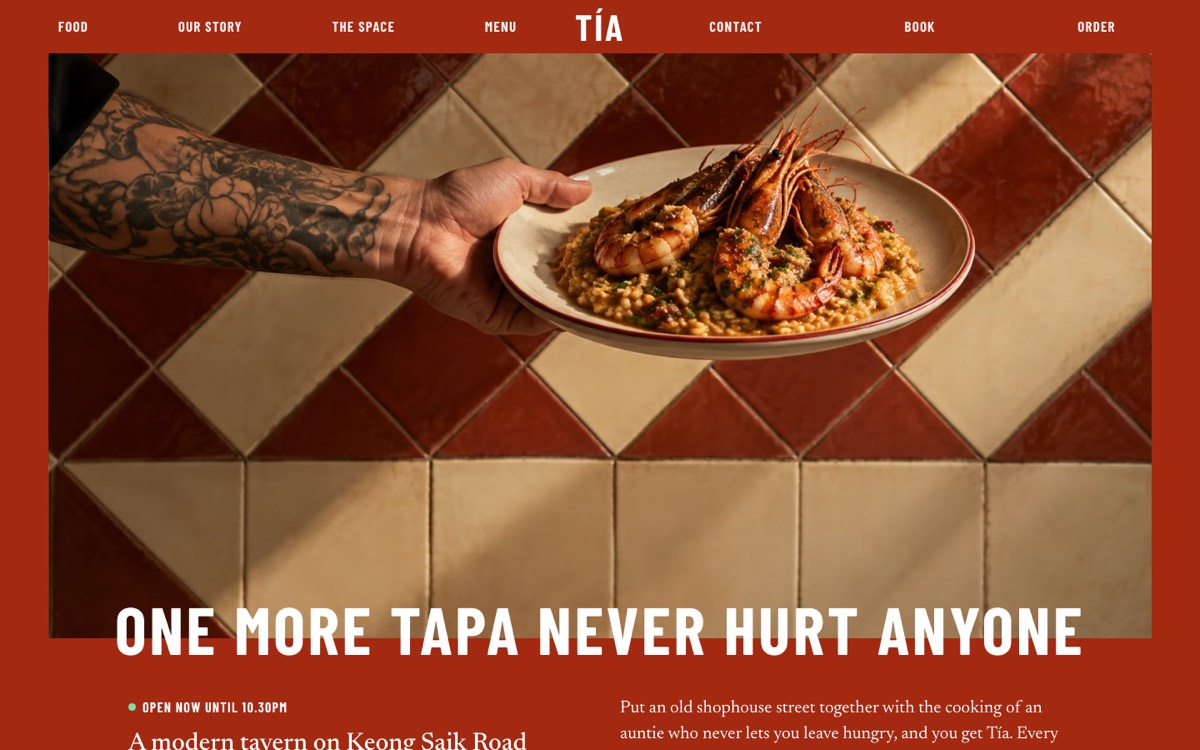
The Tavern look, shown on Tía

Bold and loud. Giant capital headings, a colour header, square buttons, big photos and a Jump to button so customers reach the menu or a booking in one tap.

See it working: Tía

Your website

  • Two templates and six colours, switched in a click and previewed with your own menu first
  • A home page, your menu, an order page and table booking, with your photos, story, bestsellers, opening hours, FAQ, reviews and social links
  • Your front photo always sits right: pick the top, middle or bottom of it to keep, and a long headline fits itself on one line
  • Your own domain, like yourcafe.ph, connected for you7
  • The same look all the way through: checkout, the order page, reviews and receipts
  • A Journal (blog) in the same look, listed on Google, with a Journal link in your menu, like Linden Lane's
  • Emails in your name, with replies going straight to your own email

Ordering

  • Pickup or delivery, several pickup points, collection days and times
  • Choices with prices: sizes, spice levels, add-ons, a message on the cake
  • A minimum order and free delivery above an amount
  • Sold out by quantity, and orders closing at your cut-off
  • Bank transfer straight to you, and an order page the customer can follow3

The kitchen

  • Prep list per day, every choice counted
  • Orders: payment received, ready, collected or delivered
  • Kitchen display for website, counter and table orders together
  • Customer screen: "Preparing" and "Ready for collection" numbers
  • Running low: ingredients your waiting orders will use up

Recipes, ingredients and waste

  • Ingredients bought as packs, used in grams: a 5 kg bag of rice, a tray of 30 eggs, a litre of milk
  • A recipe per item, with how many one recipe makes
  • Cost to make and margin for every item, from what you paid
  • Taken off your shelf when a payment is confirmed, put back if cancelled
  • Throw away and count, and see your waste in grams and pesos each month

Tables

  • Table bookings on your website: party size, only times with room
  • Seatings like lunch and dinner, with how many people you can seat
  • Confirmed straight away and emailed, with a link to change or cancel
  • Seated or no-show on the day, at a glance
  • Order at the table by QR: rounds to the kitchen, the bill paid at the counter

The counter

  • A till made for food: your menu, choices, a name to call, eat here or takeaway
  • Cash with change, GCash, Maya or card, and receipts
  • Open and close the till, with the cash drawer checked
  • One menu: each item sold on the website, by table QR or at the counter, as you choose
  • One stock count: the last bowl of laksa cannot sell twice

Your menu and your customers

  • Add and change dishes inside F&B: photos, prices, choices, labels, sold out in one tap
  • Pickup points, delivery, cut-off and closed days, and pausing orders, all on one page
  • Customers: everybody who has ordered, what they spent and their favourite dishes
  • Reviews you approve, and asking for one by WhatsApp or email
  • Discount codes, refunds and receipts, without leaving F&B

Your accounting and your data

  • Sales in your P&L, online and at the counter4
  • Cost of making it beside each day's sales, and ingredients on your balance sheet
  • Customers filed in your Contacts
  • Export whenever you like, never sold and never used to train anything5

Need more?
Here is how it grows.

The standard

Everything above

Every food business on SME AI Office gets all of it, the website, payments, kitchen and back office, for one outlet.

Ask

Missing something?

Press Feedback. If it would help other Filipino food businesses too, it goes into F&B for everyone, usually by the next working day.

Every account has a Feedback button that raises a real ticket, read by the person who writes the code.

Need it to work with a tool you already use? Ask the same way. We check that it can be done and tell you straight. You subscribe, we build the connection, and you try it on your own account. If we cannot make it work, you get your money back.

Before you sign up, [email protected] reaches the same place.

From an SME AI Office customer

“An entry point for a small start-up, without being overwhelming.”

“Looking for an easy way to manage my small business, I came across SME AI Office. This solution has an entry point for a small start-up, not overwhelming, while having more sophisticated features for future scaled-up operations. Had a chance to speak to the founder Kevin and was greatly encouraged that he listens to his clients, big or small, and is always open to see how he can improve the client experience. SME AI Office not only provides a solution, but provides the relationship management as if you are a big corporate. Very glad to chance upon this software.”

Shirley Ong · Pangolin Creatives Pte Ltd

Read every review

It does not stop at the kitchen

The rest of your back office is already here.

An order files its customer in your Contacts. Every sale and what it cost to make go into your P&L without anybody retyping them, so your profit and loss report is always up to date. It all comes with Pro 365, so none of that costs you a second subscription.

Order placed→ Money received→ On the prep list→ Ingredients taken→ Sale and cost in the P&L

That is what a large restaurant group pays six figures for and calls an ERP. Pro 365 is everything for ₱399 a month, plus everything we build after you subscribe.

Questions

Frequently asked.

I am a home baker. Is this too much for me?

No. Start with the website and the prep list, which is most of what a home business needs, free for up to 15 orders a month. Recipes are there when you want to know your cost per item, and the counter and tables can wait until you open a shop. See SME AI Office for home food sellers.

How much does it cost?

F&B is part of Pro 365, which is everything in SME AI Office for ₱399 a month. There is no extra charge for it, no commission and no per-order fee. You can also start on the Free plan: ₱0 no card, up to 15 sales a month.

Yes. Tell us the domain, like yourcafe.ph, and we connect it for you. Your website, checkout and order pages then all run on it. Emails to your customers are sent by us in your business name, and when a customer replies, the reply goes straight to your own email.

How do customers pay?

By bank transfer, straight to your bank account, so nothing is taken out of it. When the money arrives, you press “Money received” and the order moves on. At the counter you can also take cash and card.

How do recipes work?

Add your ingredients the way you buy them, like a 1 kg bag of sugar at ₱96.00, then give each menu item a recipe in grams: what one recipe uses and how many it makes. You then see what every item costs to make and what you keep, and when you confirm an order's payment, its ingredients come off your shelf.

How do I see my waste?

Write off what you throw away, like a burnt tray or spoilt milk, and now and then weigh what is left and type it in. Anything that left the shelf without going into an order shows up as waste, per ingredient, in grams and in pesos, each month.

Can customers book a table and order at the table?

Yes. Set up your seatings, like dinner at 7pm for 30 people, and your website shows "Book a table" with only the times that have room for the party. Put a QR code on each table and customers can order from their phone in rounds, which go to your kitchen display. They pay at the counter when they are done.

What happens if I leave?

Export your orders, customers and accounts as spreadsheets you can open. There is no exit fee. Your business was never ours.

Stop adding up orders
at midnight.

Put your menu in once, choose your look, and let the prep list, the recipes and the books keep up. Start free today.

  1. Every business, person and figure shown in the screens on this page is invented and illustrative.
  2. Customers pay your business directly by bank transfer, and you mark each payment received when it arrives. Nothing is deducted from what you are paid because no payment processor sits in the middle. Card payments are taken at the counter on your own card machine.
  3. Paid orders and counter sales are added to your P&L as sales, and the ingredients they used as cost of sales, on the same day. Ingredients you buy sit on your balance sheet as stock until they are used, thrown away or found missing at a count.
  4. Your records sit in a managed Postgres database on Supabase, running on Amazon Web Services, with customer details encrypted and each business's records kept apart. Under PDPA your business holds the data and we process it on your behalf. A data processing agreement is available on request.
  5. Comparison correct to the best of our knowledge at the time of writing; if a row here is wrong, tell us at [email protected] and it will be corrected.
  6. You keep your domain with whoever you bought it from; we tell you the one setting to add there and connect it on our side. Emails to your customers come from SME AI Office in your business name, with replies going to the email you set in your settings.