Help/Accounting/Profit and loss
Profit and loss
Your P&L is built from everything in Expenses and Revenue, plus payroll and depreciation. There is nothing to add up by hand.
Screenshots use a fictional business and figures. Select an image to view it full size.
Read your P&L
Go to P&L Report. It opens on Current FY, your financial year so far. Press the button to choose another period, such as Last Quarter or Last FY.
-
The five boxes at the top tell the story: revenue, less the cost of goods sold, gives gross profit; less your other expenses, gives your profit or loss. The table below shows the same thing month by month.
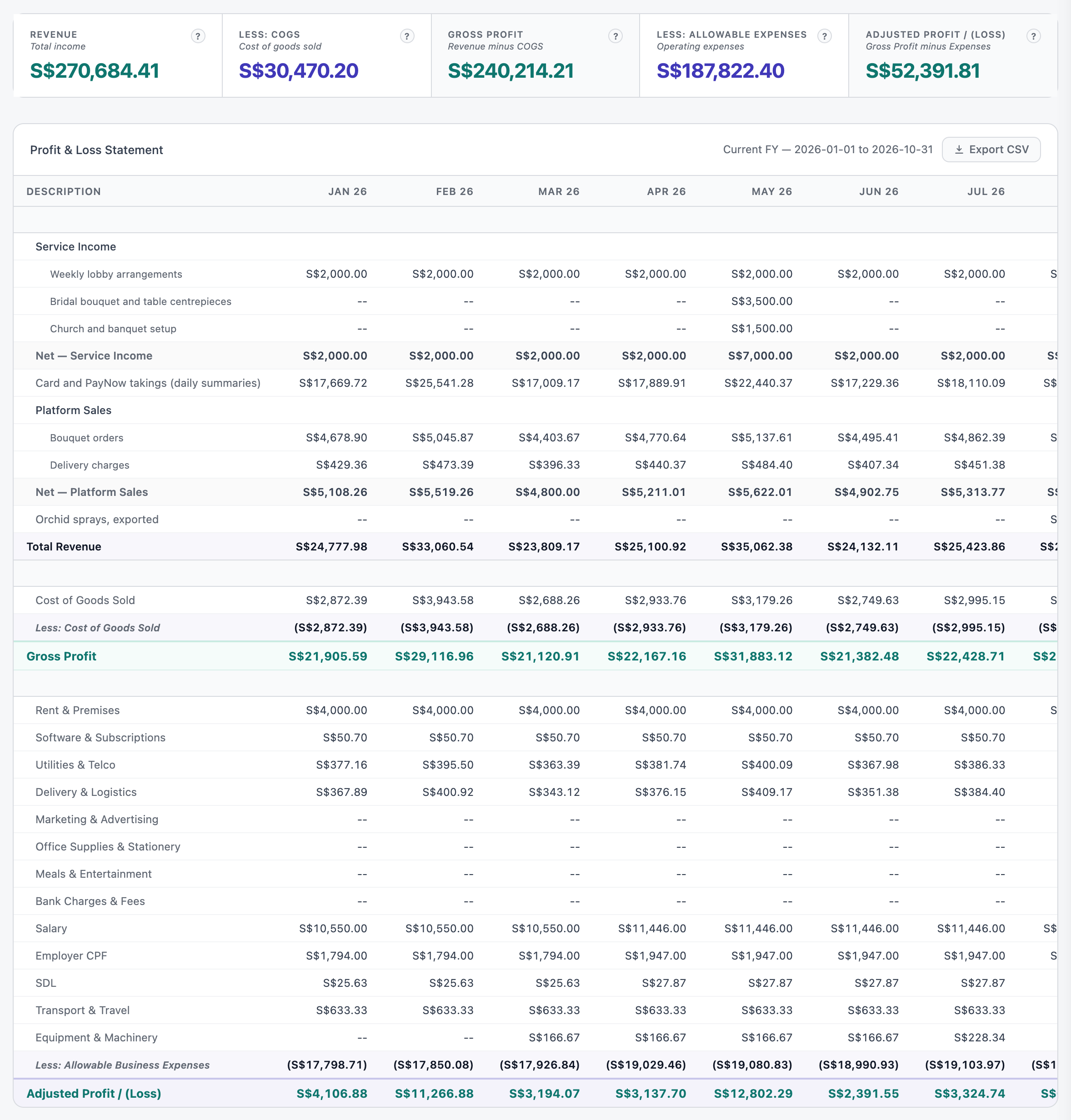
Revenue by category at the top, then cost of goods sold, gross profit, expenses and the profit for each month. Open full size Press Export CSV to download the table for your accountant.
If you are GST-registered, every figure is before GST. GST you collect and GST you can claim back are not income or costs; they go to your GST F5 and your balance sheet instead.
Salary, employer CPF and SDL arrive by themselves when you finalise payroll. Depreciation arrives when you run it on the Depreciation page.
Form C-S at year end
For a company, the Form C-S tab is a worksheet for your corporate tax figures.
Use the arrows to pick the Year of Assessment. YA 2027 covers your financial year ending in 2026. A line at the top says whether your revenue means Form C-S Lite, Form C-S or Form C, and the filing deadline.
Under Net Tax Adjustments, add back anything IRAS does not let you deduct, such as depreciation, private expenses or the part of entertainment you cannot claim. The quick buttons fill in the name; type the amount. Put your capital allowances in their own box.
Under Tax Computation, choose Start-up (first 3 YAs) or Partial (all others). The chargeable income, the exemption and the tax payable are worked out as you type.
This is a worksheet, not a filing. Your adjustments stay in this browser. Check the figures with your accountant, then file on myTax Portal yourself. SME AI Office does not file anything with IRAS.
Questions
Why does my P&L differ from my bank balance?
Profit is not the same as cash. Loans, money the owner puts in or takes out, GST paid to IRAS and equipment you bought all move your bank without being a profit or a loss. The balance sheet shows where the money went.
When does an invoice count?
On the day you issue it, whether or not it has been paid. A supplier bill counts on its bill date, even if you pay it later.
A month looks wrong.
Open Expenses or Revenue for that month and look for a receipt with the wrong date, the wrong category, or a duplicate under Needs Attention.
Next: Balance sheet · ← Accounting